| Diese Seite auf deutsch | |
| Home | Products | Download | Awards | Order |
What the System Monitor is and what you can do with it:
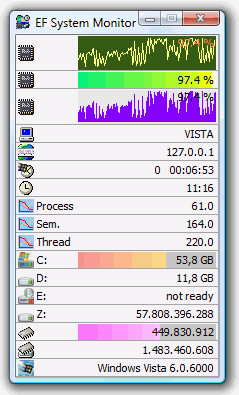
- A comprehensive tool which provides you with a permanent record of information like memory space, hard disk usage, date, time, user name, etc. about all the computers running on your network.
- EF System Monitor works on all Microsoft Windows platforms: Windows 95/Windows NT or higher.
- When you run the EF System Monitor under Windows except the Windows 9x, you can use the advanced services provided by these Windows platforms, like process and thread surveillance, advanced I/O port monitoring, CPU times, etc.
- All items are displayed in a nice & friendly fashion, using graphical histograms and icons that suggest their functions.
- The EF System Monitor can not only show you the data from your local computer, but can do much more: With the EF System Monitor Server (included in the package) you can collect and display the data from remote computers such as a TCP/IP network. To do so, just install the EF System Monitor Server on the remote computers. Under Windows 95/98 it works as simple program and under Windows (except the Windows 9x) it works as service with the same features.
- When using Windows except the Windows 9x you can use the EF System Monitor Server which is a service with the same features.
The following languages are included in the package: English, German, Arabic, Bulgarian, Catalan, Chinese, Czech, Dutch, French, Hebrew, Hungarian, Italian, Japanese, Korean, Lithuanian, Macedonian, Polish, Romanian, Russian, Serbian, Slovak, Spanish, Swedish, Turkish, Ukrainian.
Order now
The updates are free, just install the newest trial version over your full version.
Discount listDownload:
Windows 64 bit
Windows 32 bit
Windows 32 + 64 bit
Windows 9x
Portable 32 bit
Portable 64 bit
Web Installer 64 Bit
Web Installer 32 Bit
Web Installer 9xAll downloads here do not contain any virus, spyware or malware of any kind!