| Diese Seite auf deutsch | |
| Home | Products | Download | Awards | Order |
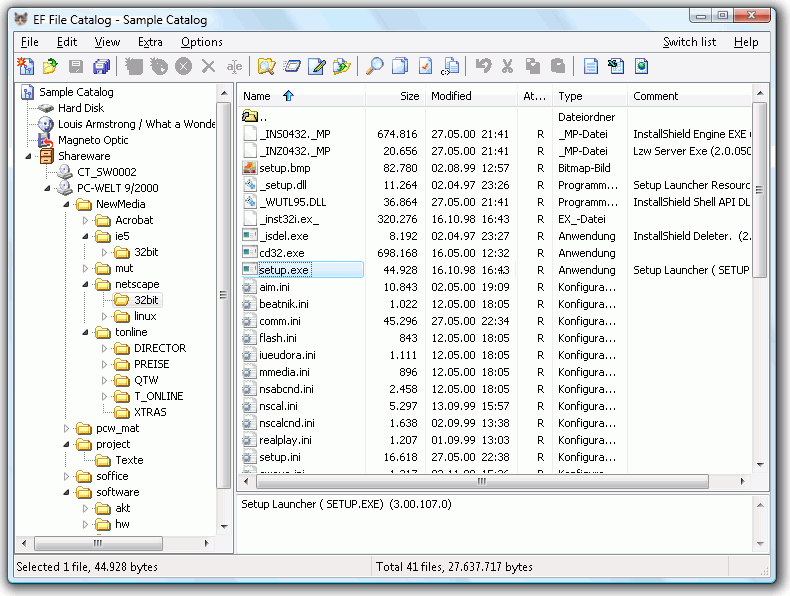
Catalog whole disks or only single directories with familiar Explorer-like user interface and makes it available for offline browsing and searching.
Here are some key features of EF File Catalog:
- Internal support for all usual compressed file formats: 7-Zip, ACE, ARC, ARJ, BZIP2, CAB, CPIO, GZIP, IMG, ISO, LHA, RAR, RPM, SFX, SQX, TAR, TAR.7Z, TAR.BZ, TAR.GZ, TAR.XZ, UDF, WIM, XZ, Z, ZIP, Zip64, ZOO.
- Unlimited external packer plugging support
- Automatic description importing
- Unlimited external description plugging support
- Extract CD information from CDDB (freedb.org and local)
- Fast search/search for dupes functions with wildcards, filtering support
- Detailed informations
- User interface with multi language support
- Exports to text, CSV, HTML
The following languages are included in the package: English, German, Arabic, Bulgarian, Catalan, Chinese, Dutch, French, Hebrew, Hungarian, Italian, Japanese, Korean, Lithuanian, Macedonian, Portuguese, Romanian, Russian, Slovak, Slovenian, Spanish, Swedish, Turkish, Ukrainian.
The EF File Catalog supports now WCX Packer and WDX Content plugins for additional pack formats and comments read. Plugins are extensions with additional functions.
No warranty provided. You use this modules at your own risk.
Please note that this plugins are written by third parties.
How to install and use a packer plugin:Download the desired module Unzip the downloaded archive to any directory Open the Options - Configuration dialog Select the "Packer Plugins" or the "Descriptions" page and add the new entry
You can now use the plugin.Limitations in the unregistered version:
30-day trial Not all Units are saved to disc Nag screen Order now
The updates are free, just install the newest trial version over your full version.
Discount listDownload:
Windows 64 bit
Windows 32 bit
Windows 32 + 64 bit
Windows 9x
Portable 32 bit
Portable 64 bit
Web Installer 64 Bit
Web Installer 32 Bit
Web Installer 9xAll downloads here do not contain any virus, spyware or malware of any kind!